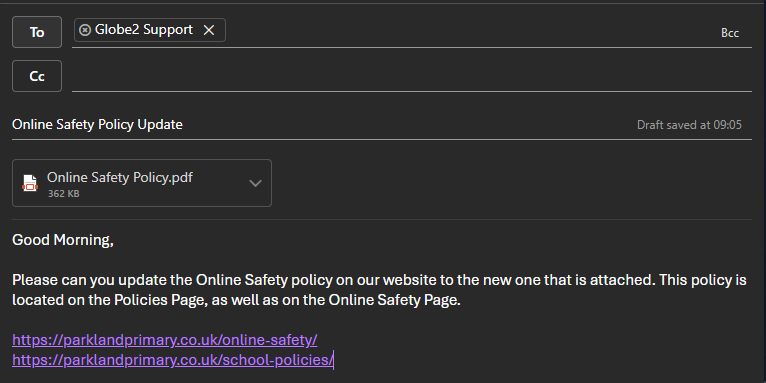
Guidelines for structuring a website update request
ForWhat happens when we are contacted?
- When we receive an email to support@globe2.net, this generates a support case, which is assigned to one of the subject,team to carry out. Confirmation of the case reference is sent out by email, and any updates to the case are also sent out by email.
- If a subsequent 'new' email is received, it creates a separate support ticket, which may then be assigned to a different member of the team.
Things which can help ensure cases are carried out efficiently and without delay:
- To update a case, please useDO reply to the ticket notification and DON'T send in a new email separately - sending a new email creates a new case, which can lead to confusion and delays.
- multiple small requests are better than saving everything into one big job
- either email us, or ask your tech support to email us - don't do both (even if it is CCing your tech support). This can lead to multiple requests for the same thing.
- a descriptive email subject rathermakes thanit justeasier "Schoolto nameidentify website".one Forcase example,from "Policyanother, replacement"otherwise orwe "Ourhave Staff10 changes".cases all named ‘[school name]’ which makes it harder to prioritise workloads.
In- thetry bodyand of the email, please beprovide as clearmuch and specificinformation as possiblepossible. with the changes that you would like making. For example: Insert the attached photo into the page in this location. Rather than: Put this photo on the website.
'Please includeadd athese linkphotos to the page[x] thatsection youon would[this likepage]' is better than 'Please add these photos to the changeswebsite'. makingThe more ambiguous the request, the more likely to ifrequire possible,additional orinformation atand leastcause statea clearly which page it is.delay.
See this example request below: